Extenuating Circumstances
HireNow Portal > Recruitment Campaigns > (select a campaign) > (Click an Applicant on main table)
Description
As a recruitment admin of HireNow, I want to be able to give applicants with extenuating circumstances an appropriate amount of extra time during an assessment so that the hiring process is fair to all applicants.
Applicable User Roles
List of roles that have access or can use this feature.
Recruitment Admin
How To
Add/Remove extra time from an application
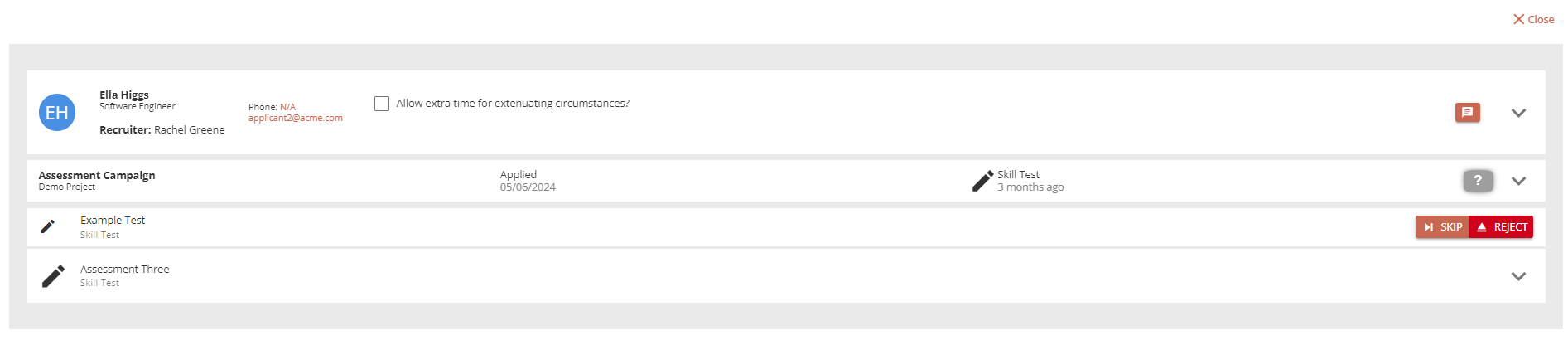
As a recruitment admin, when viewing the application steps there is now a new checkbox to give the applicant extra time on assessments. This extra time will be applied to any assessment steps that have not yet been started.
To give extra time to an applicant, click on the checkbox to enable the extra time and make the Extra Time Allocated dropdown visible.
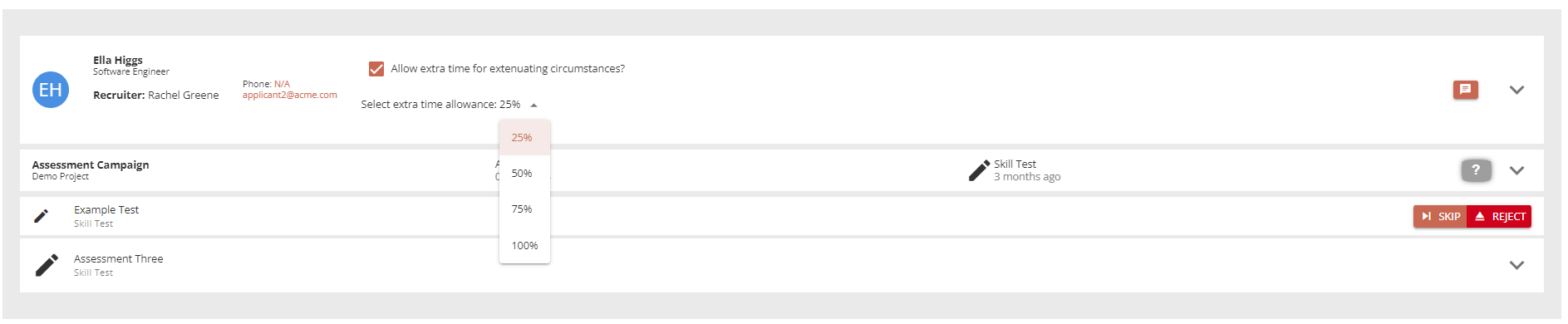
From this dropdown, select the amount of extra time you wish to give to the applicant.
To remove the extenuating circumstances, click on the checkbox again to remove any extra time. Any future assessments will not have any extra time assigned until the checkbox is checked again.
Extra Information
-
Recruiters will be able to see the status of the extenuating circumstances, but are not able to change the value.
-
When the applicant starts the assessment, they will see the modified time displayed in the Assessment Advice window.