Analytical Report Exports - API Integration
Description
As a user with an API key, I want to be able to use command line to download company data file
Applicable User Roles
List of roles that have access or can use this feature.
Users with API KEY
Company Admin
How To
There are two ways to download the JSON data for importing into a BI system. The first is via the user management page. As a admin user there is an option on the Burger menu to export company data. This will trigger a download of a JSON file containing all the projects/campaigns etc for the selected company.
The second way to get the data (same data) - is to use a CURL request with an APIKEY. The curl request looks like
curl -v -L --keepalive-time 360 --header "Authorization: Api-Key f294d506-f782-43ad-8e4f-5ce41b2f1ec1" http://localhost:5600/dataexport/campaigns
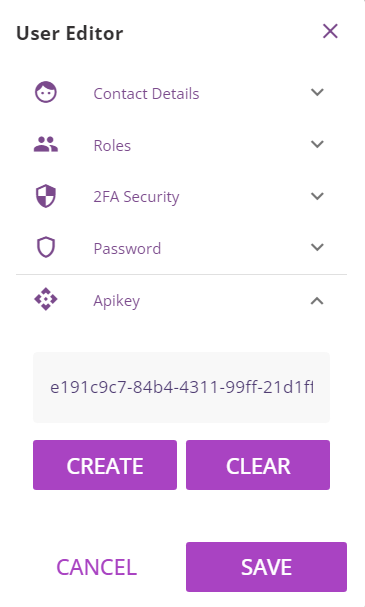
Generate API key
Before using this command you will need to set the APIKEY for the user you want to use for the export (the admin user for the company). Logging in as the system admin you will see a new option when you edit the user to set (or clear) the APIKEY. Once set (and saved) you can use the APIKEY defined in the curl request (changing the Api-Key to the value you set). Currently the only data available for export is the ‘campaigns’ data.
Available Reports
Campaigns
curl -v -L --keepalive-time 360 --header "Authorization: Api-Key XXXXXXXXXXX-XXXXXXXXXX-XXXXXXXXX-XXXXXXX" https://[company-subdomain].login.skillsnow.com/dataexport/campaigns
Teams
curl -v -L --keepalive-time 360 --header "Authorization: Api-Key XXXXXXXXXXX-XXXXXXXXXX-XXXXXXXXX-XXXXXXX" https://[company-subdomain].login.skillsnow.com/dataexport/teams
Reviews [DO NOT USE - Known Issue]
curl -v -L --keepalive-time 360 --header "Authorization: Api-Key XXXXXXXXXXX-XXXXXXXXXX-XXXXXXXXX-XXXXXXX" https://[company-subdomain].login.skillsnow.com/dataexport/reviews
Skills
curl -v -L --keepalive-time 360 --header "Authorization: Api-Key XXXXXXXXXXX-XXXXXXXXXX-XXXXXXXXX-XXXXXXX" https://[company-subdomain].login.skillsnow.com/dataexport/skills
Training Paths
curl -v -L --keepalive-time 360 --header "Authorization: Api-Key XXXXXXXXXXX-XXXXXXXXXX-XXXXXXXXX-XXXXXXX" https://[company-subdomain].login.skillsnow.com/dataexport/trainingpaths
Courses
curl -v -L --keepalive-time 360 --header "Authorization: Api-Key XXXXXXXXXXX-XXXXXXXXXX-XXXXXXXXX-XXXXXXX" https://[company-subdomain].login.skillsnow.com/dataexport/courses